Are you looking for a remote control compatible with your device? To identify the correct remote control, it is essential to know the brand and exact model number of your device.
Quick access
🔎 Where can I find the model number?
🏷️ What information should I note down?
⚠️ Device or remote control reference?
1. Where can I find the model number of my device?
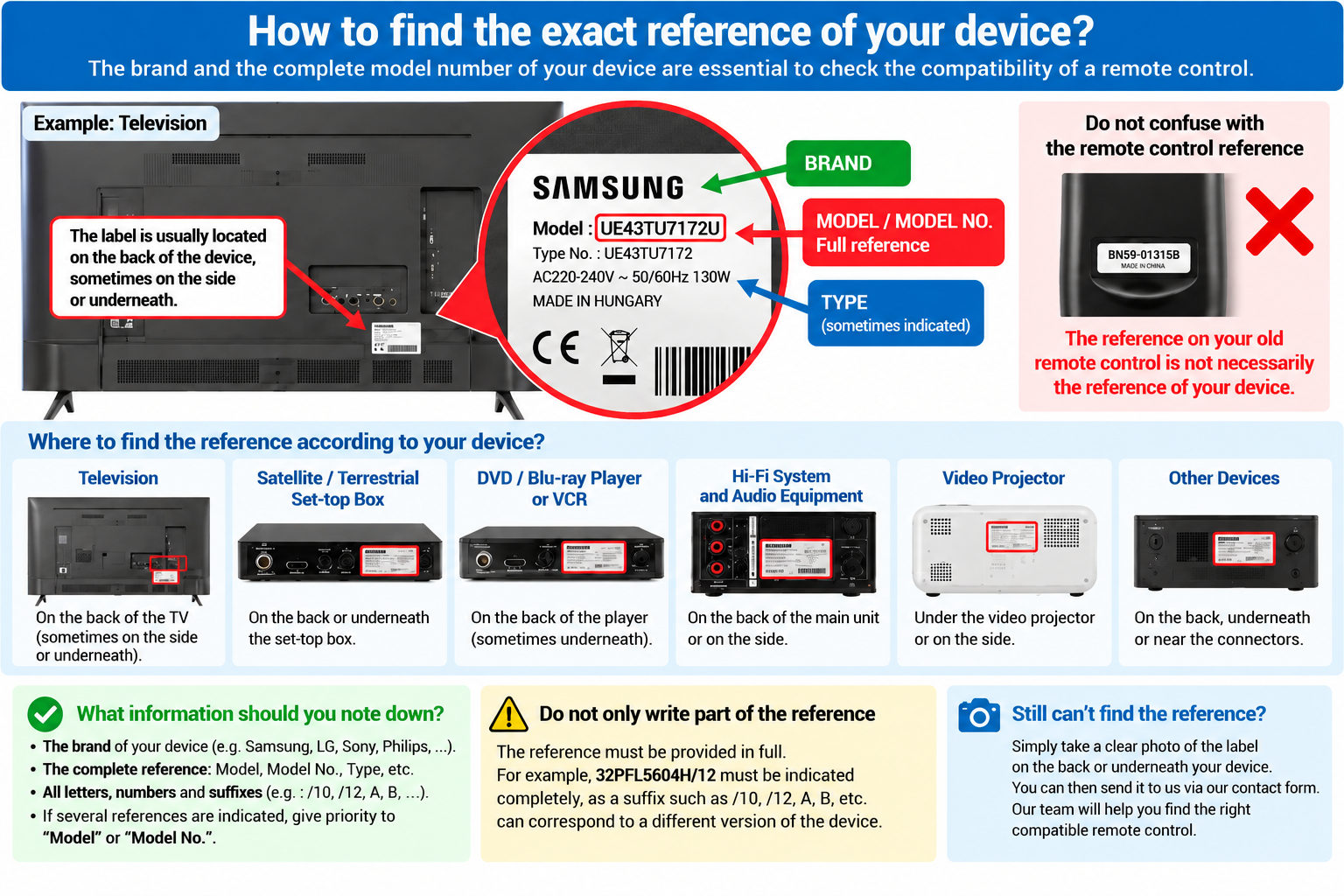
The model number is usually shown on an identification label attached directly to the device.
Depending on the type of device, this label may be located:
- on the back of the device;
- underneath the device;
- on one of the sides;
- near the connectors or power input.
2. Where should I look depending on the type of device?
Television
The label is usually located on the back of the TV. On some models, it may be on the side or near the HDMI, antenna or power connectors.
Satellite / Terrestrial Set-top Box
Look mainly on the back or underneath the set-top box. The label may also be located near the serial number.
DVD / Blu-ray Player or VCR
The model number is usually shown on the back of the device. On some models, the label may be underneath.
Hi-Fi System and Audio Equipment
Look for the label on the back of the main unit. Be careful not to provide only the speaker model number when looking for the remote control for your Hi-Fi system.
Video Projector
The label is frequently located underneath the projector or on one of its sides.
Other Devices
For fans, air conditioners, media players, lighting equipment and other remote-controlled devices, look for an identification label on the back, underneath or near the connectors.
3. What information should I note down?
On the label, look primarily for:
- the brand of the device;
- Model;
- Model No.;
- Type;
- or any other information corresponding to the device model number.
Brand: PHILIPS
Model: 32PFL5604H/12
In this case, please provide: PHILIPS 32PFL5604H/12.
4. Do not confuse the device model number with the remote control reference
A common mistake is to provide only the reference printed on the back or inside the old remote control.
The same original remote control may sometimes be used with several different device models. Conversely, devices with very similar model numbers may have been manufactured with different electronic configurations.
To check compatibility correctly, we therefore mainly need the brand and exact model number shown on the device itself.
5. Always provide the complete model number
It is important to copy all characters of the model number, including letters, numbers, hyphens, dots, slashes and suffixes.
If the label shows 32PFL5604H/12, do not provide only 32PFL5604.
The H/12 suffix may be important for identifying the exact version of your device.
Depending on the manufacturer, suffixes such as /10, /12, A, B, E, H or other characters may correspond to different device versions.
6. Several references appear on the label: which one should I use?
A label may contain a lot of information: model, type, serial number, product number, power specifications, manufacturing date, etc.
Look primarily for:
- Model;
- Model No.;
- Model Number;
- Type.
7. I have a combination device
Some devices combine several functions:
- TV + DVD;
- DVD + VCR;
- TV + set-top box;
- Hi-Fi system with DVD player;
- other combined audio/video equipment.
In this case, always provide the complete model number of the combination device. This will help us find a remote control suitable for all of its functions.
8. Still cannot find the model number?
You do not need to identify every number on the label yourself.
Simply take a clear photo of the complete identification label located on the back, underneath or on the side of your device.
Please make sure that:
- the entire label is visible;
- the characters are clear enough to read;
- the photo is not too dark;
- the brand and Model / Model No. / Type information are visible.
Our team can then examine the label and help you identify the information required to check remote control compatibility.
You will be redirected to our secure contact form, where Remote Control Support / Compatibility will be automatically selected. You can attach a photo of your device label directly to your message.
Have you found your model number?
Keep the brand and complete model number of your device. This information will help you search more accurately for a compatible remote control in the Remote-Control-Shop catalogue.
If you are unsure before or after placing your order, our team can help you check compatibility using this information.